


OVERVIEW
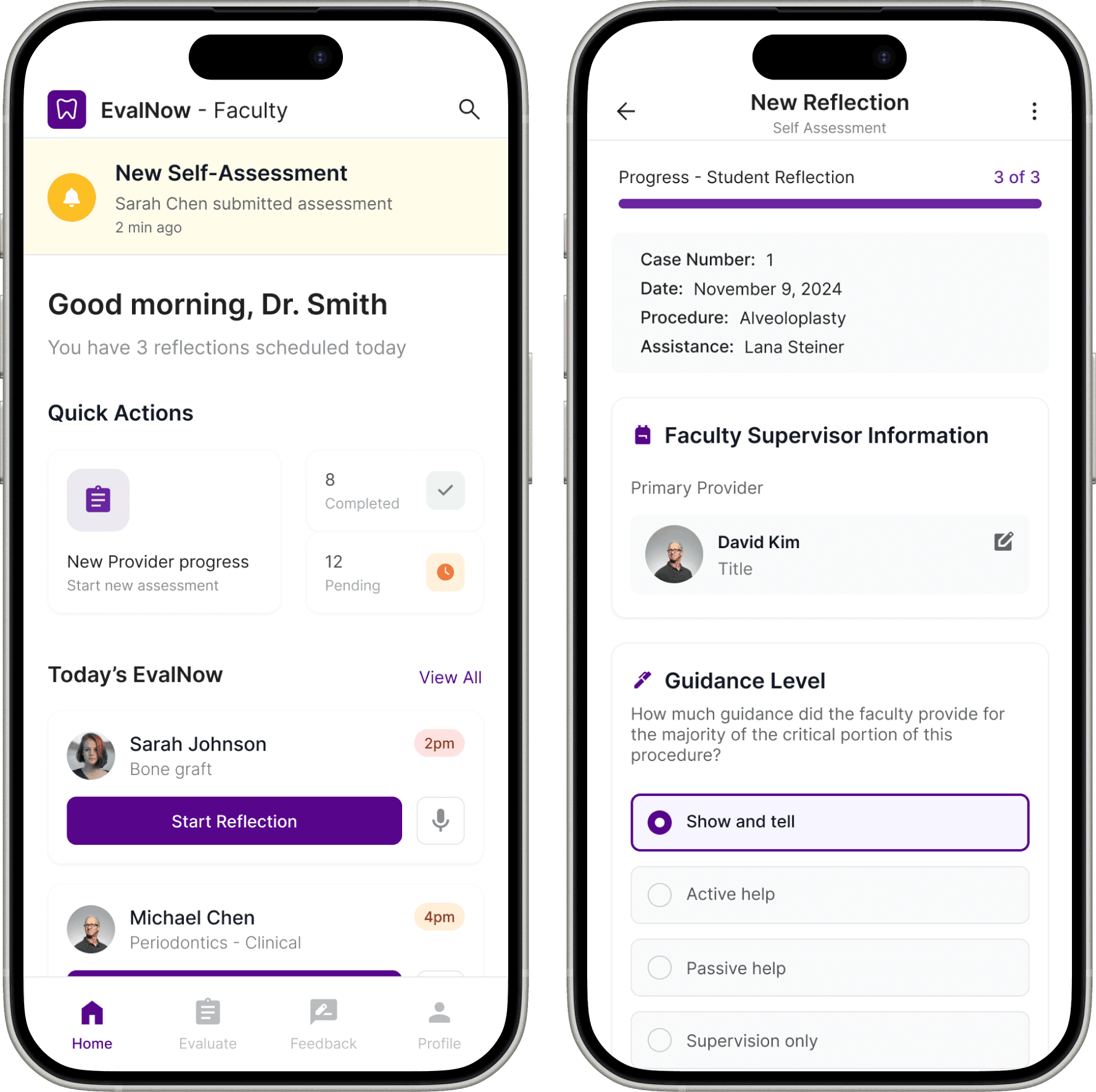
Our team redesigned EvalNow, a clinical feedback platform for the NYU College of Dentistry, to make evaluations faster, more consistent, and more meaningful for both students and faculty.
Context: A web application used by dental students and faculty to document clinical performance and provide competency-based feedback during patient care.
OPPORTUNITY
How might we transform EvalNow from a static evaluation form into a low-friction, psychologically safe feedback app that supports clinical growth?
Enterprise Client Design
Medical Technology
Mobile Interface
UX Research
Design Solution
Design challenge
Clinical feedback in high-stakes learning environments lacks transparency, consistency, and continuity, resulting in fragmented workflows, emotionally charged experiences, and weak standardized evaluations by faculty.
Feedback arrives too late to influence the next clinical session.
Verbal comments are quickly forgotten.
Emotional discomfort discourages honest conversations.
There is no longitudinal record of growth or repeated issues.
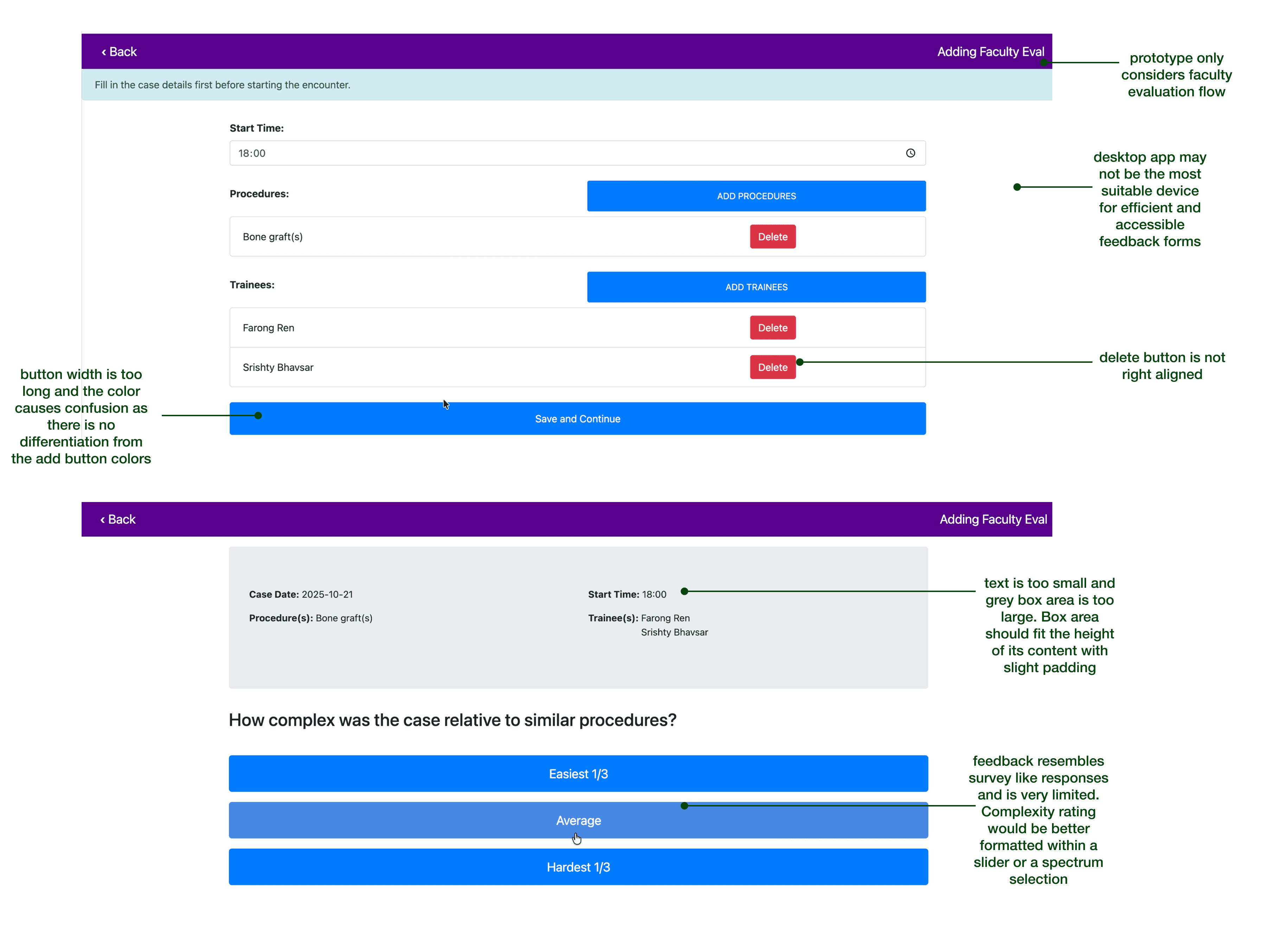
We concluded that the current EvalNow prototype was limited in its survey-like questions, lacked a student flow, and did not have a mobile-friendly format that would be intuitive for both students and faculty.
Research
Our research focused on understanding how clinical feedback is delivered and experienced across NYU Dentistry’s undergraduate clinics.
1
2
3
Our literary research emphasizes that effective clinical feedback must be both timely and embedded within existing workflows, allowing instructors to capture brief, in-the-moment insights without disrupting care or increasing cognitive load. The literature also highlights the importance of bidirectional feedback, where students and faculty reflect on the same clinical encounter, compare perspectives, and engage in structured dialogue, transforming feedback from a one-way evaluation into an ongoing learning conversation.
Market analysis
The current market for medical feedback systems is fragmented and largely reliant on generic evaluation tools that struggle to balance ease of use, real-time clinical integration, and meaningful longitudinal insight, leaving significant opportunity for solutions tailored to the unique demands of healthcare education.
01 · KEY FINDING
High-performing systems centralize student information and feedback history in a single view.
User Flow
Clarity
Feedback and Rubric Structures
02 · KEY FINDING
Real-time documentation must be extremely lightweight to fit into clinical environments.
Reflection Processes
03 · KEY FINDING
Students benefit from clear progress indicators that reduce uncertainty and support self-regulation.
Longitudinal assessments
Dashboard and progress views

Example of MedSimAI Feedback User Flow
Evidence-Based User Insights
"Students do not fully recognize the value of constructive feedback so more often I am working with student feelings and emotions rather than constructive teaching." - Dental Faculty Member (Survey)
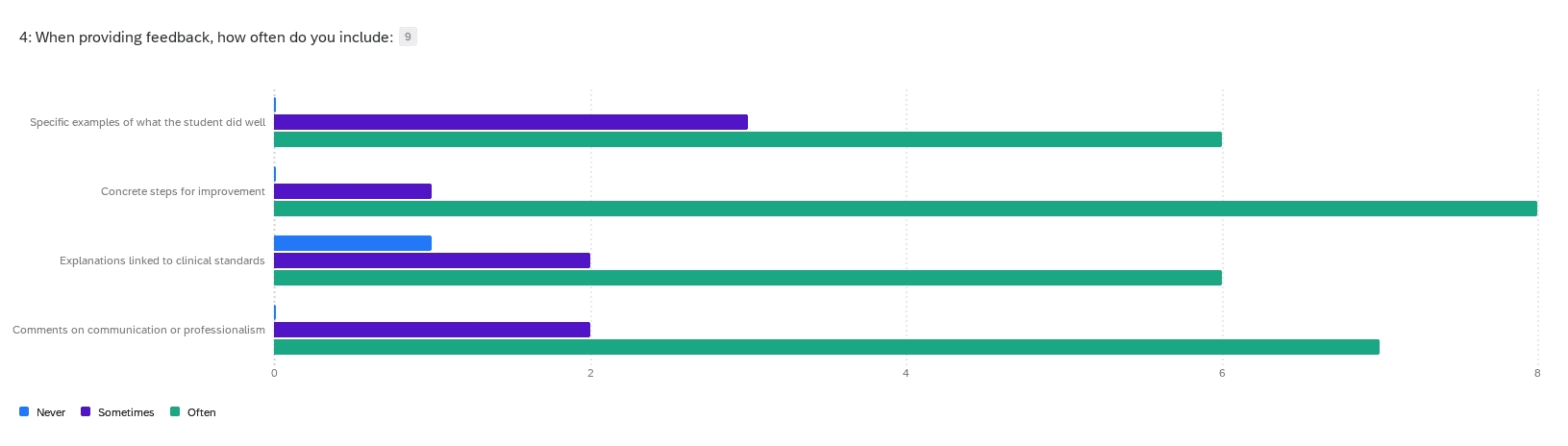
Using Qualtrics, we surveyed 14 dental faculty members and 2 dental students to identify patterns in satisfaction, clarity, workflow alignment, and emotional responses to the current process.
01 INSIGHT
Students consistently seek clarity about expectations and performance trends.
02 INSIGHT
Faculty report friction when documenting feedback during patient care.
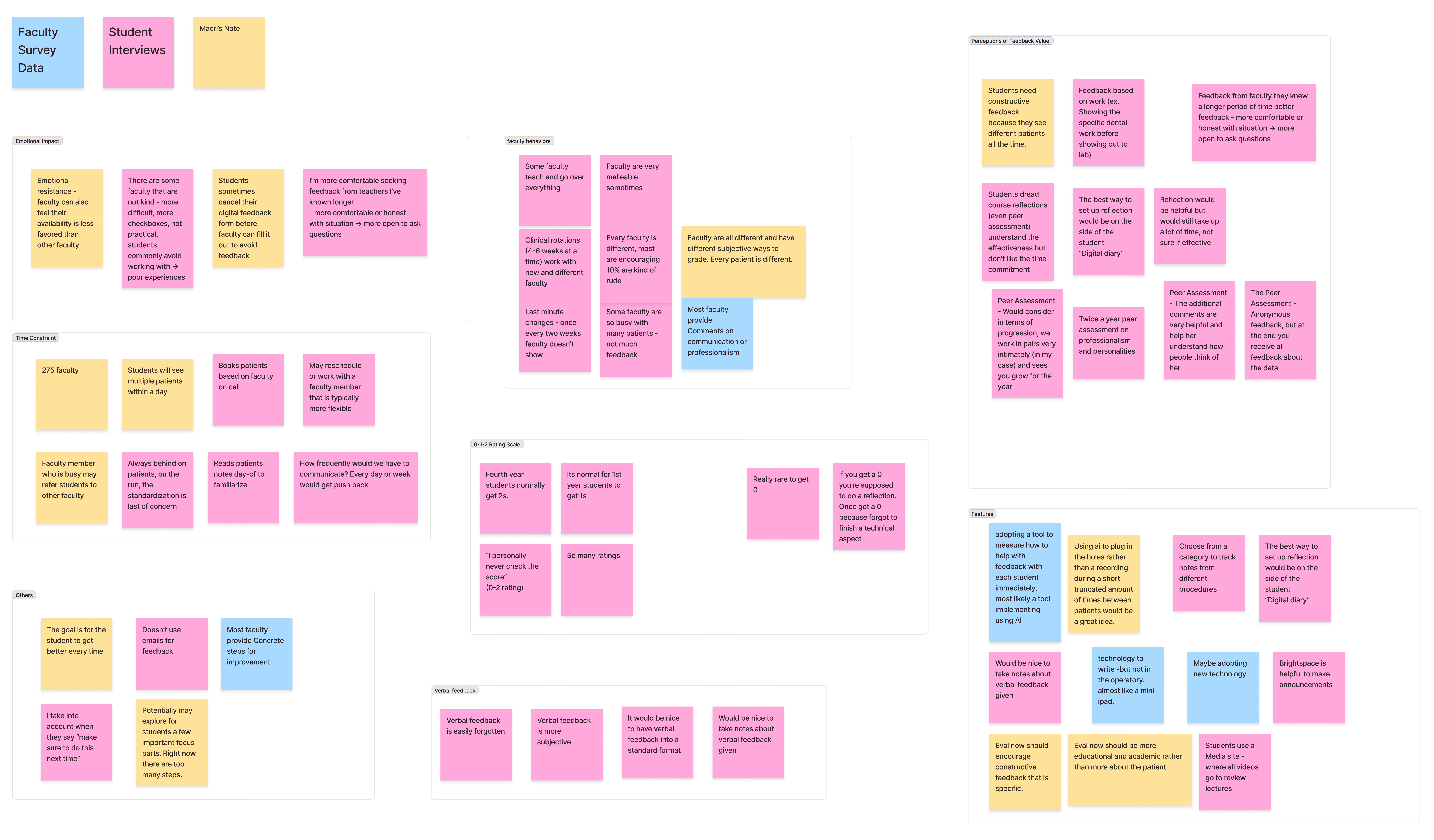
We conducted two semi-structured interviews with fourth-year dental students across diverse clinical rotations to understand how they prepare for patient encounters, interpret varying faculty expectations, and emotionally and cognitively respond to feedback.
03 INSIGHT
Students often enter the clinic without knowing which faculty member they will be assigned, creating unpredictable expectations.
04 INSIGHT
Variability in scoring and comments makes it difficult for students to see whether they are improving.
05 INSIGHT
Reflection is often rushed and disconnected from the rest of the workflow.
IDEATION
Our team prioritized the ideation of the faculty flow in order to be considered for the continued research funding of the project.
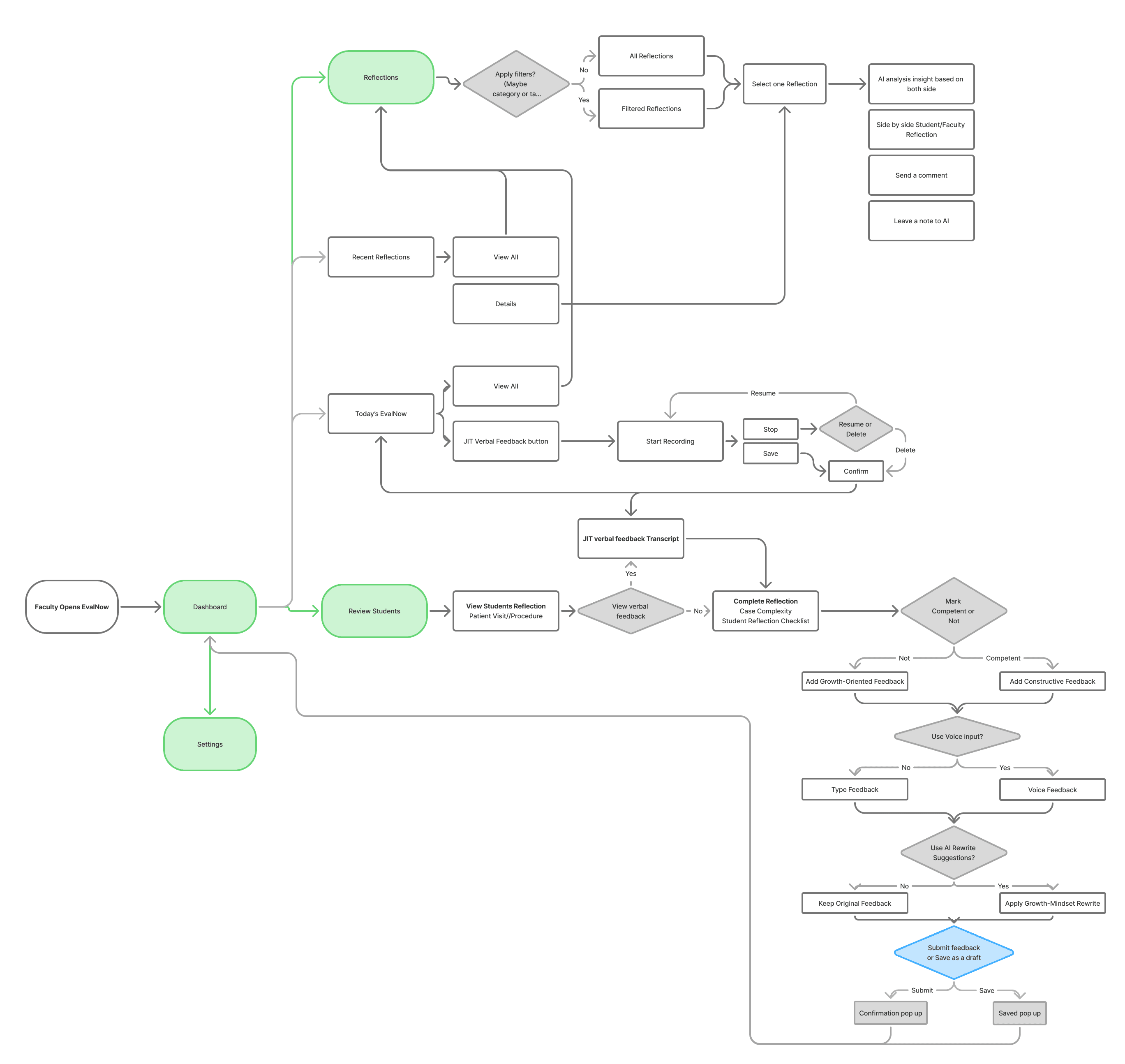
This user flow was created during the ideation phase to map how faculty might move through EvalNow as part of their real clinical routines. It explores end-to-end interactions, from reviewing students and capturing in-the-moment verbal feedback to reflecting on longitudinal insights and delivering structured, growth-oriented evaluations. The flow helped surface key design considerations around reducing cognitive load, supporting flexible feedback inputs (voice and text), and embedding reflection and AI assistance without disrupting clinical workflows, ultimately guiding early feature prioritization and system architecture decisions.
03 INSIGHT
Students often enter the clinic without knowing which faculty member they will be assigned, creating unpredictable expectations.
04 INSIGHT
Variability in scoring and comments makes it difficult for students to see whether they are improving.
05 INSIGHT
Reflection is often rushed and disconnected from the rest of the workflow.
The redesign effort aimed to integrate high-priority features that allows faculty to complete formative assessment.
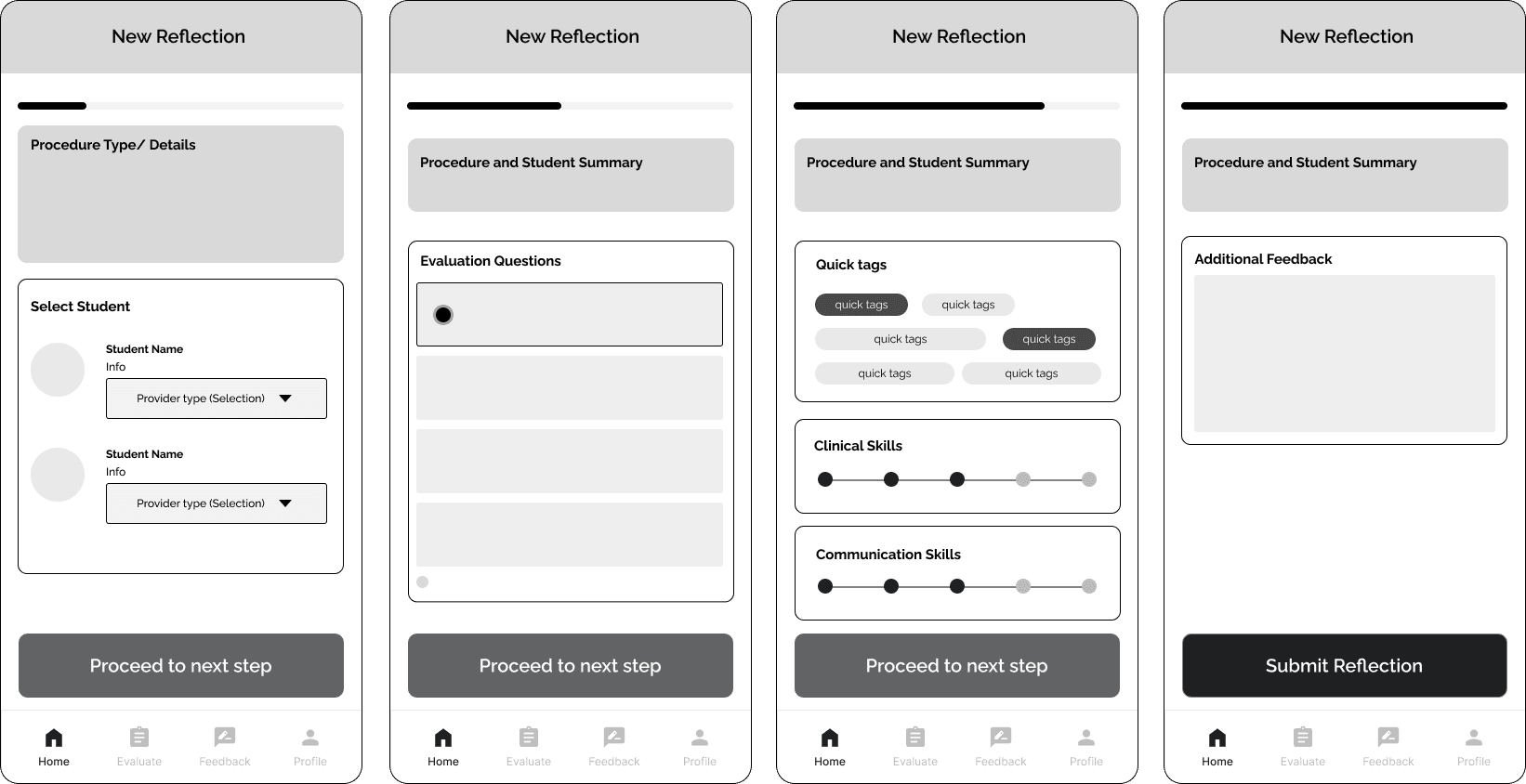
The interface follows a form-like design but allows for quantitative feedback types such as radio buttons, multiple choice, quick tags, and a spectrum selector. At the end, there is a space for faculty to give additional feedback that was not applicable in the earlier sections.
High fidelity design
While the final designs of the EvalNow are still ongoing, these high fidelity screen designs allowed our team to prepare the concepts for technical specifications necessary in the next stage of funding, testing and development.
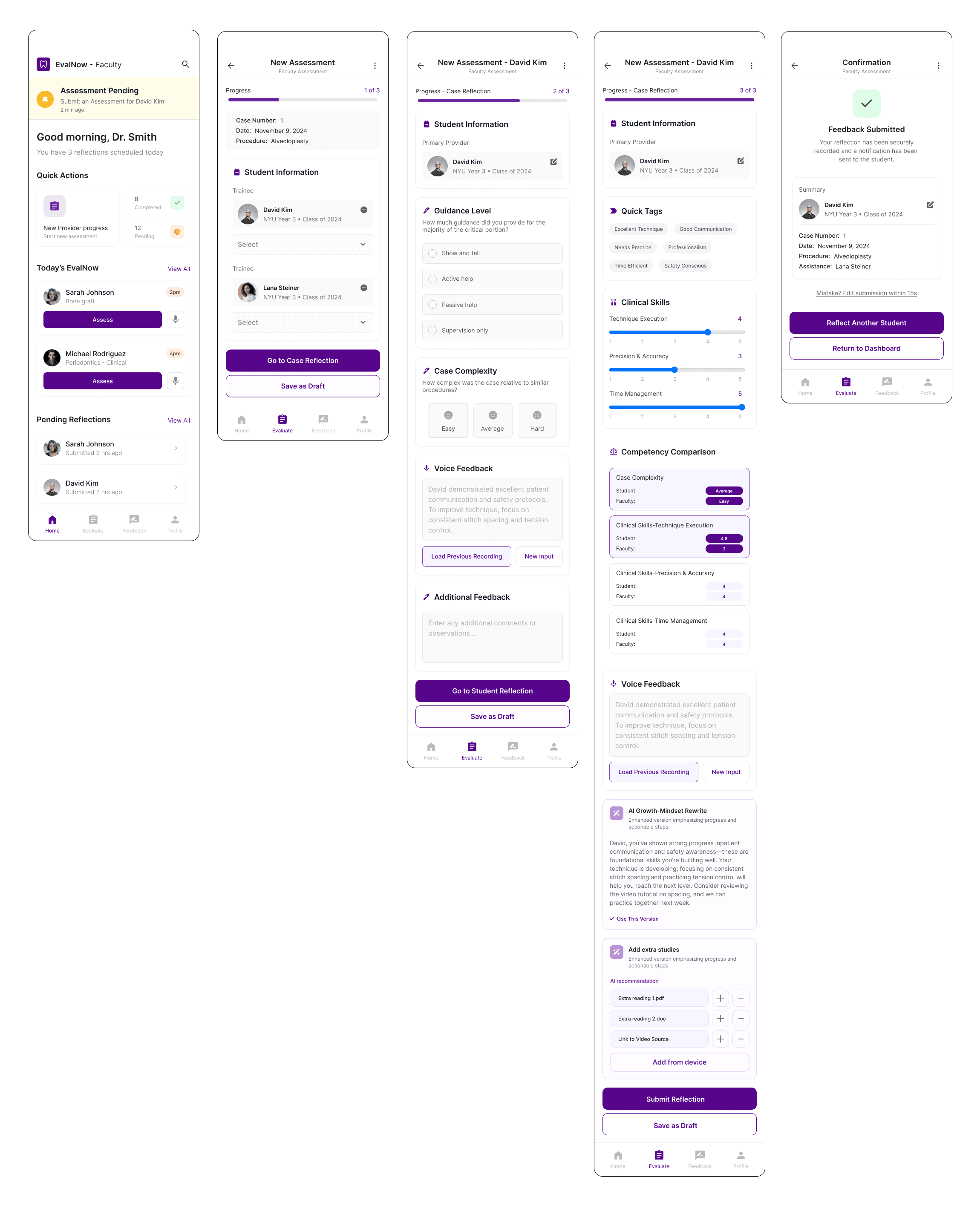
These high-fidelity screens illustrate the redesigned faculty assessment flow, from reviewing pending evaluations to submitting structured, growth-oriented feedback. The experience prioritizes speed and clarity through progressive disclosure, quick tags, voice input, and competency sliders, allowing faculty to capture insights efficiently during busy clinical sessions.
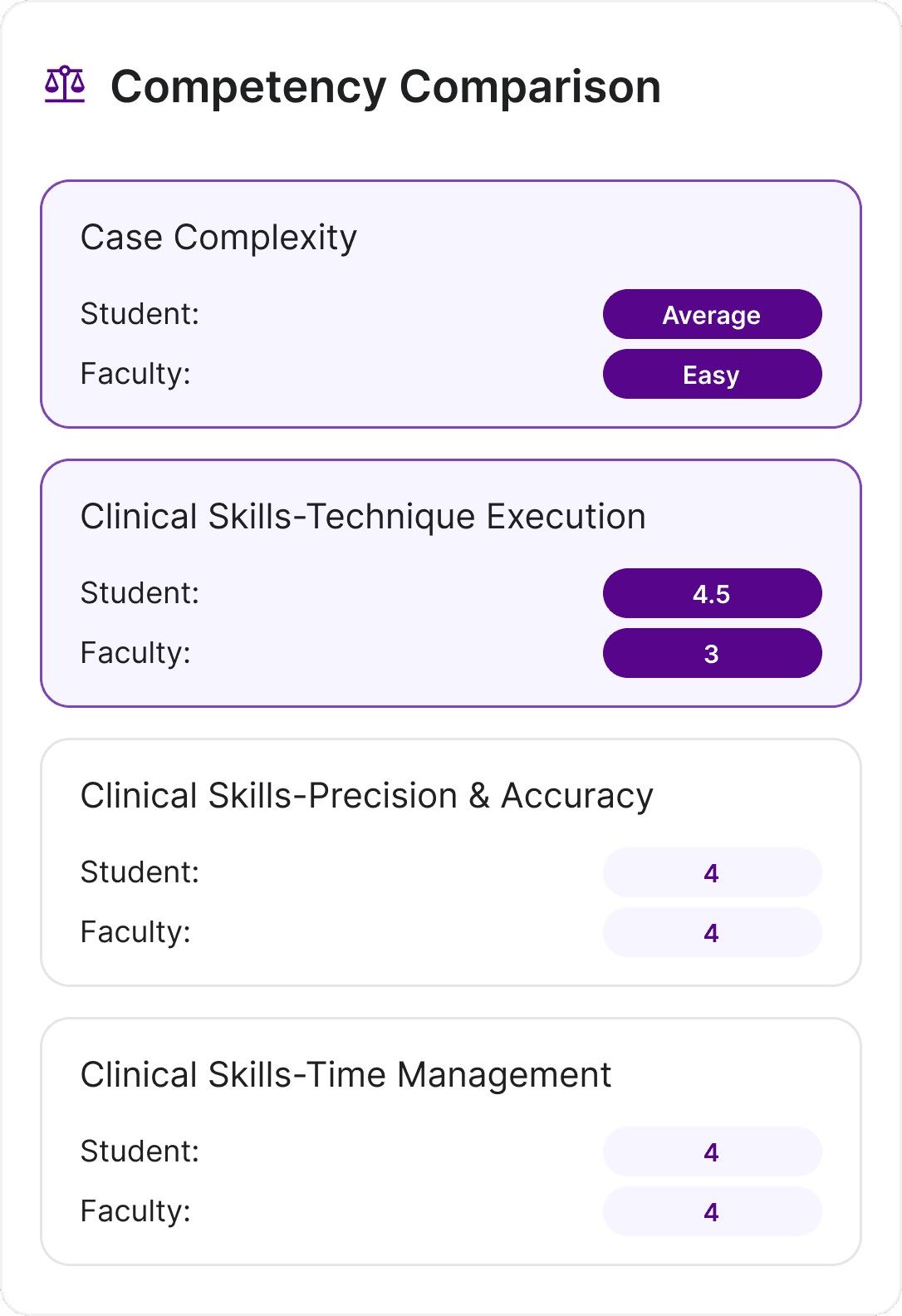
Competency Comparison
Our clients requested a clearer understanding of students’ self-perception before writing their own evaluations. They emphasized that without seeing the student’s reflection first, their comments often lacked alignment, specificity, or meaningful dialogue. As a result, we designed a competency comparison card that allows faculty to review the student's own assessment from a scale of 1 to 5.
AI Re-write and supplemental recommendation
Our clients were interested in the use of AI within the EvalNow app. Through our literary review research and competitor analysis, we decided that the implementation of an "AI Growth-Mindset Rewrite" feature and an "Add extra studies," card would help faculty give constructive feedback that promotes growth within students to reduce the high emotional feelings associated with the existing feedback process. The rewrite summarizes the student's progress and recommends actionable steps for them to take. The "Add extra studies" cards supports the concept of giving students actionable steps by providing them real resources on the technical challenges they are facing.


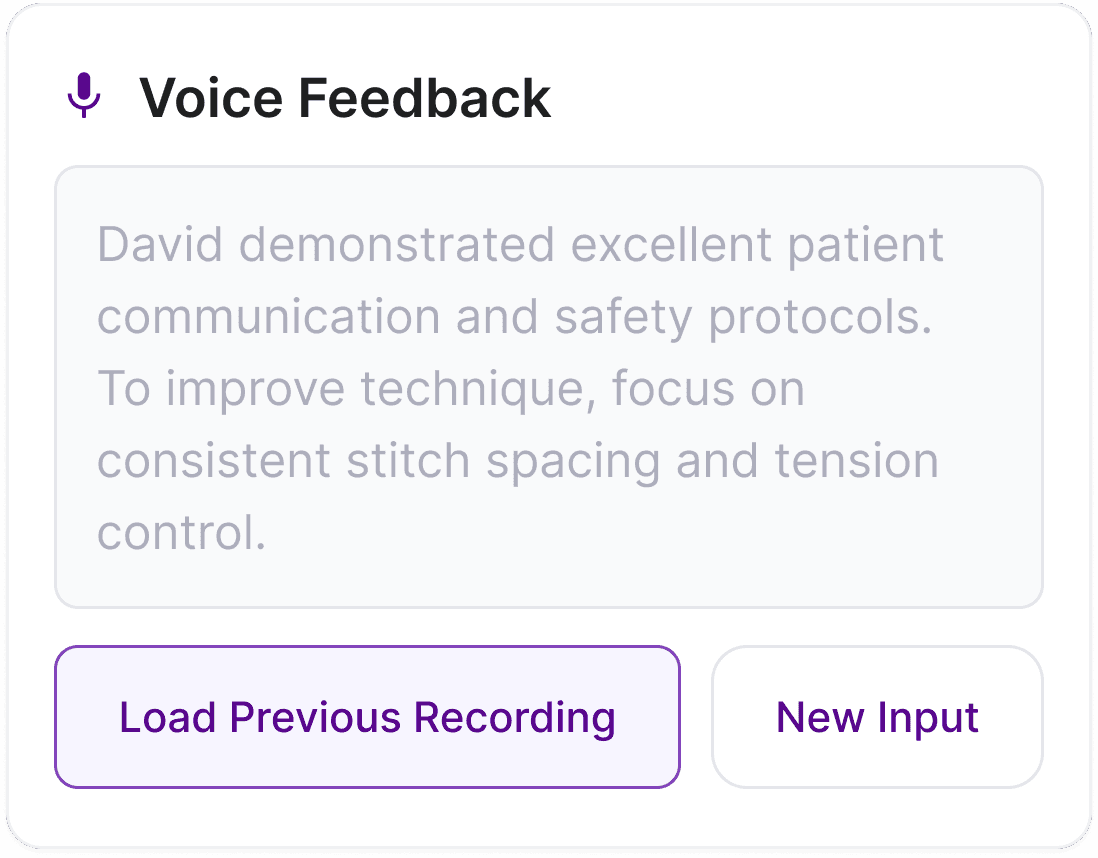
Voice feedback
Finally, we added a voice note feedback that would speed up the typing process for faculty. This voice memo is transcribed into a text format and can be edited by the faculty if inaccurate.
reflection
Designing for HIPAA compliance opened my eyes to the privacy concerns of AI in medical technolgy and healthcare spaces.
INSIGHT
Overall, this project has been extremely satisfying to work on. I am grateful that our clients instilled trust in our team to reimagine the EvalNow interface and take direction on complex issues such as HIPAA, constructive feedback flows, and efficiency.
Understanding patients' privacy through empathy and healthcare research was critical in my understanding how features such as voice recording and AI were included in the app. Because patients' names and information could not be disclosed, we had to be strategic about how to create a flow that focuses primarily on the student dentist treating them and their skills.
IMPACT
Secured NYU research funding by pitching user-centered research findings and product design strategy in 5 months.
NYU College of Dentistry is the largest dental school in the United States, training nearly 10% of the nation’s dentists. With more than 900 faculty and staff, 400+ dental chairs, and over 350,000 annual patient visits, the school operates at a scale comparable to a major healthcare system.NYU College of Dentistry is the largest dental school in the United States, training nearly 10% of the nation’s dentists. With more than 900 faculty and staff, 400+ dental chairs, and over 350,000 annual patient visits, the school operates at a scale comparable to a major healthcare system.
next steps
As we move onto the next steps in the project we will conduct more interviews with students in the dental college and gather quantitative and qualitative data that will support the design of a student-facing EvalNow platform.
Once a high fidelity prototype is finalized for students, we will begin testing the prototypes and observing how they work in conjunction to each other. If ready, the prototype designs will be passed onto development within the NYU IT department to create a first beta version of the app.
prototype
Up next